Escalate overdue tasks to Slack
What you'll build
Every weekday morning, a workflow looks for tasks whose due date has passed and posts a single digest to a Slack channel — and stays quiet on the days when there is nothing to report. The optional second half adds Approve and Snooze buttons to that message, so the follow-up happens in Slack and writes straight back to the task.
What you need
- A Slack connection. Posting needs only the bot token with
chat:write; the button half also needs the signing secret and an Interactivity Request URL configured on your Slack app. - A process that already creates tasks with due dates — any of the other recipes will do.
The workflow, step by step
1. Add the schedule trigger
In a new process, add a Schedule Trigger node.
- Schedule expression —
30 8 * * 1-5, a standard five-field cron: minute, hour, day of month, month, day of week, where day of week counts0= Sunday. That is weekdays at 08:30. - Timezone — an IANA zone such as
Europe/Madrid. Unset means UTC.
The editor also offers a dropdown-driven builder over the same field, so you can pick "every weekday at 08:30" instead of typing cron. Either way, cron is what gets stored.
A scheduled run carries no external request, so this node's payload is emitted as
its result on every run — whatever downstream nodes need from the trigger has to be
written there by hand.
2. Fetch the overdue tasks
Add a Fetch Tasks node named Overdue.
- Process — the process whose tasks you are chasing. With no filters at all the node scans the entire organization, so always narrow it.
- Completion status: Due — only tasks that are still open.
- End date — the end of the due-date window. Use the field's code override with
new Date().toISOString().slice(0, 10)so "overdue" means due on or before today and moves with the calendar. - Max results — defaults to 100 and is capped at 1000. Results past the cap are dropped silently, which is another reason to filter tightly.
Overdue.result.tasks is an array in the canonical task shape — the same object a Task
Update Trigger delivers, so anything you build against it works wherever the task came
from.
3. Stay quiet on quiet days
Add an If-Else node after it, with one condition:
(Overdue.result.tasks || []).length > 0
The || [] guard matters: a node that failed returns a null result, and an
unguarded expression fails with it. Everything downstream hangs off this node's IF
handle, so on a clean morning the run ends here with nothing posted.
4. Build the digest
Add a Run JavaScript node named Digest on the IF branch:
const tasks = Overdue.result.tasks || []
const lines = tasks.map(t => `• ${t.name} — due ${t.dueDate}`)
return { count: tasks.length, text: lines.join("\n") }
Upstream node names are in scope as variables, and whatever the node returns becomes its
result. The sandbox has no network or filesystem access; console.log output lands in
the node's log rather than in the result.
5. Post it
Add a Slack node.
-
Integration — your Slack connection.
-
Action: Send message, Target type: Channel, and pick the channel.
-
Message format: Plain text, with:
*{{ Digest.result.count }} overdue tasks*{{ Digest.result.text }}
Slack's own API response comes back as this node's result. The key worth remembering
is result.ts, the posted message's timestamp: it is what a later Slack node needs to
update that message or to reply in its thread.
6. Release
Save, release the workflow, and unpause the process. Schedules fire only from the current release of an unpaused process — a draft never runs on its cron.
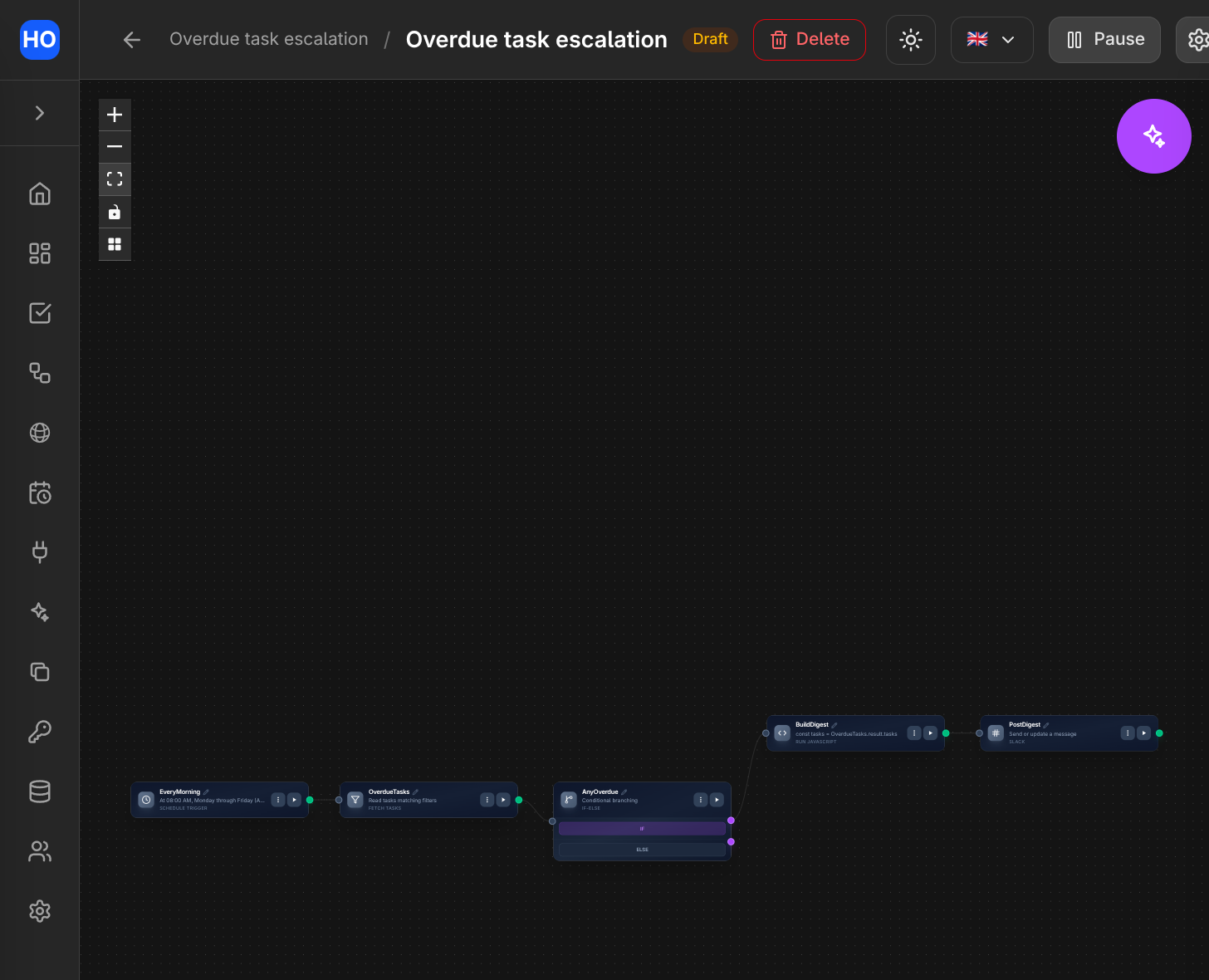
The finished workflow: a weekday schedule fetches overdue tasks, and when there are any, builds a digest and posts it to Slack.
Variations
- Buttons that write back. Post the digest with Message format: Blocks and give
each button an
action_id(snooze_1d,mark_done). Then build a second workflow starting from a Slack Interaction Trigger filtered to those action ids: branch on{{ Trigger.result.actions[0].action_id }}with an If-Else, act with an Update Task node (push the due date, or set completed), and finish with a Slack node using Action: Update message and{{ Trigger.result.message.ts }}so the prompt is replaced by the outcome. - One thread per morning. Add a Loop node over
{{ Overdue.result.tasks }}and post one message per task with the digest'sresult.tsas the thread ts. The loop's body must connect back to the loop'sclosehandle — that is what starts the next iteration. - Chase the assignee instead. Set the Slack node's target type to User to send a direct message. A Create Task node's result is enriched with the assignee's Slack id for exactly this, so escalating at creation time needs no second lookup.
- Escalate by email. Swap the Slack node for a Send Email node against an Email (sending) connection when the audience is outside Slack.