Agents and Barry
Honeybase has two AI surfaces, and they are not the same thing.
- An agent is something you build: a configuration that runs on its own, with tools, budgets and an approval policy.
- Barry is the copilot inside the app. It helps you build processes, workflows, forms, teams and agents, and it debugs runs with you.
Both run on your own model provider key. You create an AI connection with credentials from OpenAI, Anthropic, Google, AWS Bedrock or another supported provider, and everything AI in Honeybase goes through it. Your provider bills you; there is no opaque credit system in the middle, and switching provider is changing a connection.
Agents
An agent is a versioned configuration, in the same sense a workflow is:
| Instructions | The system prompt: what this agent is for and how it should behave. |
| Model | An AI connection and a model on it. Only models that support tool calling are offered, because an agent without tools is just a prompt. |
| Tools | What it is allowed to do. See below. |
| Brakes | A maximum number of turns per run and a spend cap per run (USD). Tools that need a human each ask individually (their per-tool policy). |
| Budgets | A monthly budget in USD per agent, and one across all agents. Budgets are estimated spend on your own AI connection: the proxy reports each call's cost when it knows the model's price, and Honeybase prices it from the public model catalog (or a conservative flat rate, shown with a "~") when it does not — a model nobody priced is never free. Exceeding a budget pauses the agent and notifies whoever you nominated. |
| Structured output | Optionally, a JSON schema the agent's final answer must match — which is what makes an agent usable as a step inside a workflow. |
Like a workflow, an agent has an editable draft and released versions. The draft is what the built-in test chat runs, so you can iterate on a prompt without anything else in the organization picking up the change. Releases are what production uses. A paused agent refuses runs.
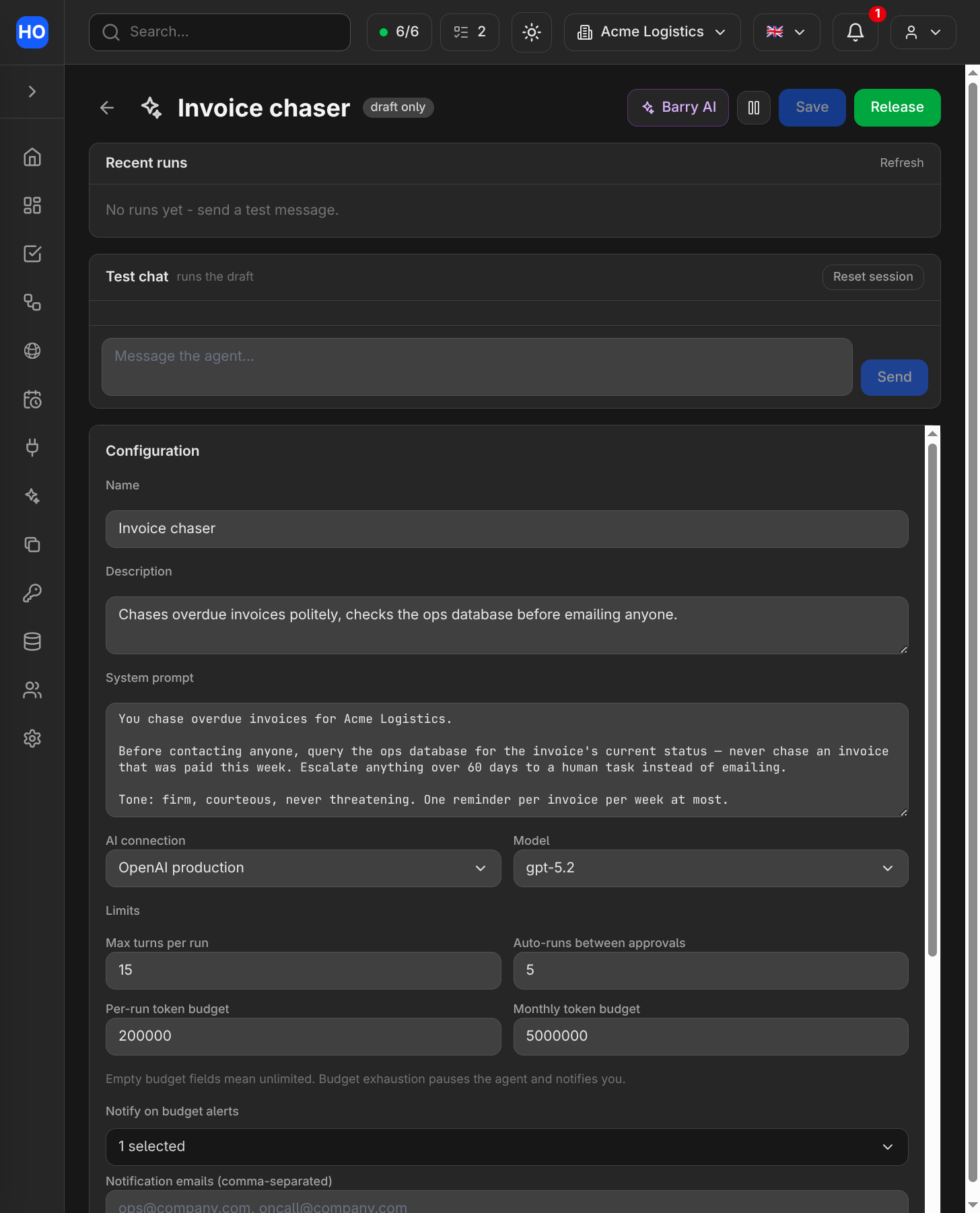
The agent builder: instructions, model, attached tools and budgets on one page, with a test chat that runs the draft.
Tools
An agent can do nothing except talk until you give it tools. Three kinds:
- Built-in tools. Implemented by Honeybase — web search and page fetching where your deployment has them enabled, and tools that your connected integrations offer directly: query a database, send an email, search a mailbox, post to Slack, read a sheet, work with tasks. Attaching a connection is all it takes; there is no wrapper to build.
- Agent tools you build. A tool is a process whose released workflow is the implementation, with a typed input schema the model fills in and a chosen output. If you can build it as a workflow, an agent can call it.
- Other agents. An agent can delegate to another agent, which is how you build a supervisor over specialists. Delegation is depth-limited and cycle-checked, and budgets are inherited down the chain rather than reset.
Every tool is declared read-only or mutating. Read-only tools run freely; mutating ones pause the run and ask. When a run is waiting on you, you can approve it, reject it with a message the agent sees and adapts to, or edit the arguments and then approve — which is usually faster than explaining what was wrong.
Web tools
Each web tool has its own provider and Who pays setting. Choose Honeybase or one of your organization's matching Exa, Firecrawl, or Browserbase connections. A failed customer key never switches payer or provider automatically. If a page was already fetched successfully, an escalation failure preserves that direct content.
| Tool | Default provider | Behavior |
|---|---|---|
web_search | Exa | Ranked search results; Firecrawl and Browserbase are alternatives. |
web_fetch | Firecrawl | Tries a direct page read first, then the selected provider for blocked or empty pages. Exa and Browserbase are alternatives; Browserbase Fetch does not run JavaScript. |
web_interact | Browserbase | One browser action per call. Firecrawl is an alternative. |
Browser actions can change external data, so Ask permission approves one call at a time. The approval card shows the provider, payer, model and session state. Task approval pauses close the browser. Approving a call with an expired handle returns an error; previous actions are never replayed automatically. Sessions also close when the run ends, after five idle minutes, or after ten minutes overall. Auto-approve is an explicit choice for uninterrupted browser workflows.
Browserbase normally uses the agent's AI connection. You can select another structured-output model on that connection, or explicitly use Browserbase Model Gateway, which Browserbase bills. Agent-model mode requires the administrator to configure a public HTTPS proxy origin before saving the agent. Firecrawl includes its own browser model. When Gateway usage reporting is unavailable, browser actions retain their result and charge an estimated token allowance. Browser and inference costs count toward the run's USD cap, including when you use your own keys. Search and fetch costs are recorded without changing that cap.
Runs
Every agent run is recorded: its steps, the tools it called and with what, its status, and the tokens and cost it consumed. Runs are watchable live while they happen.
Agents connect to the rest of the product through the AI node: a workflow step can call a model inline, or delegate to a released agent and use its answer. The run history of the workflow links to the agent run it produced, so one failed nightly job is traceable end to end.
Barry
Barry is the copilot embedded in the app. It appears on the home page, where it can see the whole organization, and in the workflow editor and agent builder, where it works on the thing you have open.
What it is good at:
- Building. Describe an automation and it drafts the workflow — nodes, connections, expressions — validated the same way the Save button validates it. It writes forms, teams and tasks the same way.
- Answering questions about your organization. Which automations failed last night, what a connection is used for, why a task went to a particular person, when someone is off.
- Debugging. From a failed run, "Fix with Barry" opens a chat that has already read the run: which node failed, what it received, what it returned.
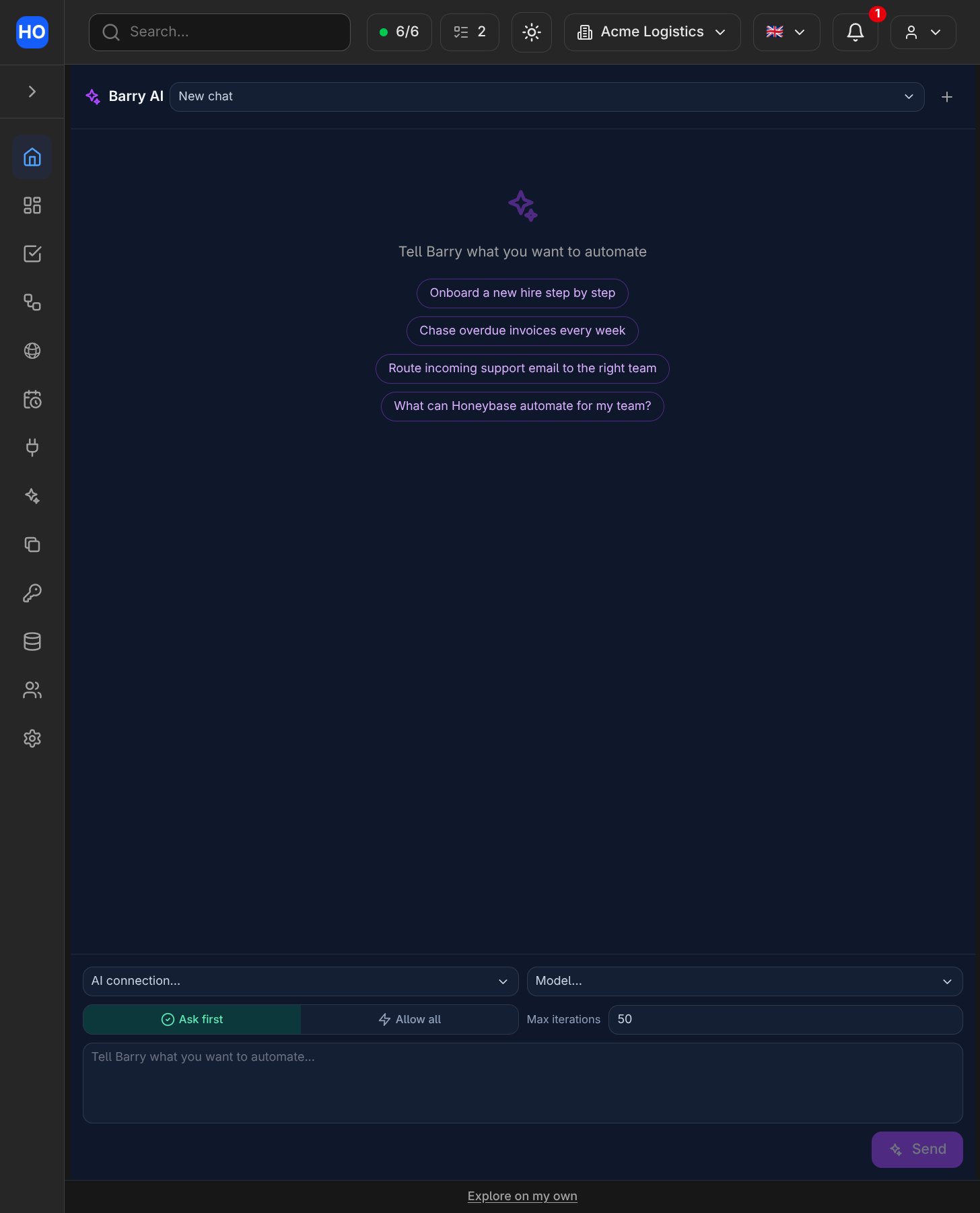
Barry, the copilot. Tell it what you want to automate; the Ask-first / Allow-all switch decides whether its writes need your approval.
Writes need your approval
This is the part worth understanding before you use it.
Barry proposes; you decide what persists. Anything that changes data pauses on an approval card describing the change — a summary the server computes from the actual request, not a sentence the model wrote about itself. You approve, or you reject with a note, and the note goes back as the correction ("also ask for the invoice number"), which usually gets the right answer in one more step instead of a new conversation.
Each chat has a permission mode: ask permission, the default, pauses before every change; allow all is a per-chat opt-in for when you are iterating fast on a draft. A new chat never inherits it.
Some actions always ask, in both modes: saving a workflow, releasing one, running a process, pausing or resuming one, and anything that touches a connection. And a proposal you have rejected cannot be re-asked in the same turn — the failure mode of an approval prompt is repetition until someone clicks yes, not the first card.
Barry never holds your credentials
When something needs a credential — connecting a database, adding a provider key — Barry does not ask you to type it into the chat. It raises the real setup form in the chat, identical to the one on the integrations page. Your value goes to the secret store the same way it always does, and what Barry learns afterwards is the outcome: whether a working connection now exists. There is no path by which a secret you type becomes part of the conversation.
What Barry cannot do
- Change your availability or schedules. It can read both. The single exception is turning a member's acceptance of one process on or off, which is a routing preference and always asks first.
- Delete things. Deletion is a person's job.
- Submit forms on someone's behalf. Filling in a form is human-only.
- Invite people or hold API keys.
Content from your systems is data, not instructions
Barry and agents routinely read material Honeybase did not author: run outputs, API responses, form answers from members and from strangers with a public link, pasted node JSON. All of it is presented to the model as data, explicitly marked as something never to be followed as an instruction, with values from third-party systems scrubbed of credential-shaped content and size-capped. It is the reason a supplier can put text in an invoice without steering your automation.
This is a property of the product, not a setting you configure. It is worth knowing about anyway, because it is the question a security review will ask.