Processes, workflows and runs
Three objects, in a strict order: a process contains workflows, and executing a released workflow produces a run.
Process
A process is the unit you create, name, and think about — "Invoice intake", "Weekly payroll check". It owns:
- its workflows, draft and released;
- its run history;
- settings that apply to every version of it: an execution timeout, a limit on how many loop iterations run in parallel, who gets notified when a run fails, and any JavaScript packages its script steps may import;
- a paused switch.
Settings live on the process rather than on a workflow version on purpose. Raising a timeout or fixing a notification address is an operational change, and you should not have to cut a new release to make one.
Paused
Pausing is the stop button, and it is worth knowing exactly what it does:
- Automated triggers — webhooks, schedules, inbound messages — are dropped, not queued. A webhook delivery still gets an accepted response, so the sender does not retry, but no run starts.
- Runs already queued when you pause finish as skipped.
- Schedules stop firing, and start again when you resume.
- A manual run is exempt. Pause gates automated triggers; you can still run a paused process yourself to test it.
Kinds of process
Most processes are ordinary: something triggers them, they do work, they end. Two variants exist because their entry and exit points differ.
- An endpoint is a process you call over HTTP and get an answer back from. Its workflow ends on a Response node, which decides the body and status code its caller receives. Calls are synchronous by default; explicit async endpoint calls appear in Run History and use the normal cancellation controls.
- An agent tool is a process whose released workflow is the implementation of a tool an AI agent may call. See Agents and Barry.
Workflow: draft and released
A workflow is a graph — nodes connected by edges — inside a process.
| Draft | Released | |
|---|---|---|
| Version | none | major.minor, e.g. 1.0 |
| Editable | yes | never |
| Automated triggers fire from it | no | yes, from the current release |
| Test runs from the editor | yes | yes |
A release is immutable. Once a workflow has a version number, nothing edits it in
place. Saving a released workflow — from the editor, from Barry or over MCP — creates a
new row instead: a new draft, or the next version if you released. (The raw GraphQL
saveWorkflow mutation is the one exception: it refuses, so an API client that saves
over a release by mistake hears about it.) This is not a formality: run history points at
the exact version that produced each run, so a run from six weeks ago is still
explainable by a definition that still exists and still says what it said then.
Automated triggers fire only from the current release of an unpaused process. A trigger you add to a draft does nothing until you release it. This surprises people exactly once.
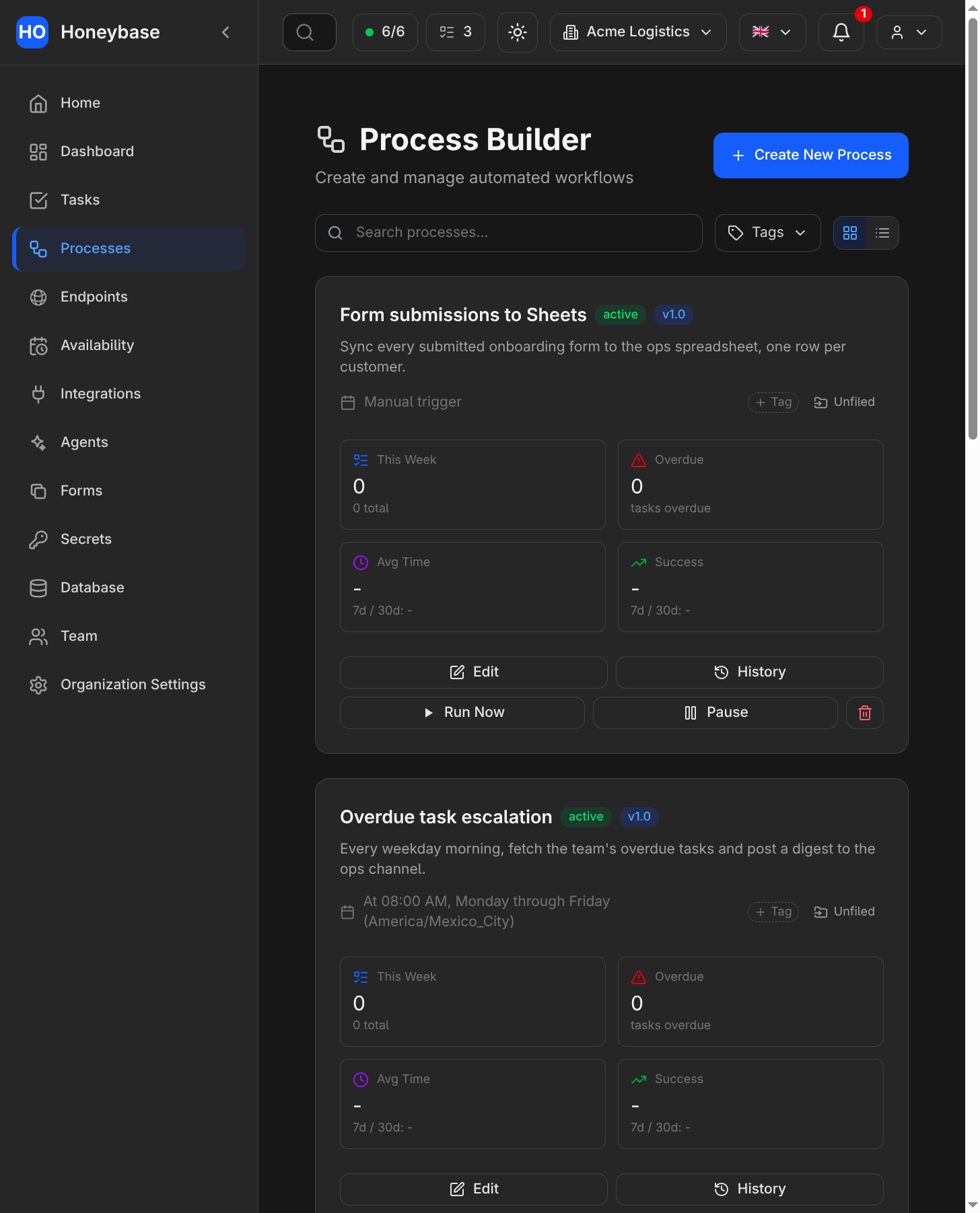
The process list. Each card shows the released version it runs (here v1.0 and v1.1) alongside its live stats.
Nodes
Every workflow starts at a trigger and continues through steps. A workflow with no trigger cannot run.
| Group | Nodes |
|---|---|
| Triggers | Webhook (an HTTP POST to the process's URL), Schedule (a cron expression), Task Update, Form Submission, Slack message, Slack interaction (a button click), WhatsApp message received, WhatsApp interactive reply, WhatsApp delivery status, Email received (IMAP polling) |
| Flow control | If-Else (branch on conditions, each with its own outgoing path), Loop (iterate a collection sequentially, in parallel, or in batches), Sleep (a bounded pause) |
| Code | Run JavaScript (a sandboxed snippet whose return value becomes the step's result), Run JS with Files (the same, for data too large to hold in memory — it streams rows in and writes files out), Archive (unpack a zip, 7z, tar or gz — password-protected zips and 7z included — into files, or zip files together) |
| Data | Fetch SQL (read), Mutate SQL (insert/update/delete/upsert, assembled from structured fields rather than raw SQL), Call API (any HTTP API), Google Sheets, Google Drive, Fetch Emails |
| People | Create Task, Update Task, Get Tasks, Create Pre-filled Form |
| Messaging | Send Email, Slack message, WhatsApp message |
| AI | AI (call a model, or delegate the step to one of your agents) |
| Composition | Run Process (call another process's released workflow and use its result), Response (end an endpoint workflow with a body and status) |
Which nodes are available depends on what you have connected — a Slack node needs a Slack connection, a SQL node needs a database connection or your organization's own database. See Integrations.
Passing data between nodes
Each node's output is available to the nodes downstream of it, addressed by node name.
Fields that accept an expression take a {{ }} block, evaluated as JavaScript over the
run's data — {{ Trigger.result.body.email }} reads a value out of the trigger payload.
That is why node names matter: renaming a node rewrites the references to it.
Two deliberate exceptions, both about safety rather than convenience:
- Fetch SQL does not interpolate. Dynamic values enter a query only as bound parameters, so a value from a webhook can never become SQL.
- Mutate SQL takes no SQL at all. You pick a table, an operation, and column-to-value mappings; the statement is built server-side, identifiers are checked against the live schema, and updates and deletes require at least one condition.
Runs
A run is one execution of a released workflow. It records, per node, the input it received, the result it produced, any error, and anything the step logged.
A run ends in one of these phases:
| Phase | Meaning |
|---|---|
Queued | Accepted, waiting for a worker |
Running | In progress |
Complete | Every reachable node finished |
Partial | A node errored, but the rest of the run completed |
Failed | The run stopped on an error |
Cancelled | Someone cancelled it |
Skipped | It was queued when the process was paused, so it never executed |
Cancelling a queued run drops it before it starts; cancelling a running one stops it at the next node boundary rather than mid-step.
Test runs from the editor are not runs. While building, you can execute a single node — Honeybase resolves the steps it depends on and runs those first, so you can iterate on one step without firing the whole workflow. Those executions are for you, live in the editor, and never appear in run history. Only real, triggered executions are recorded.
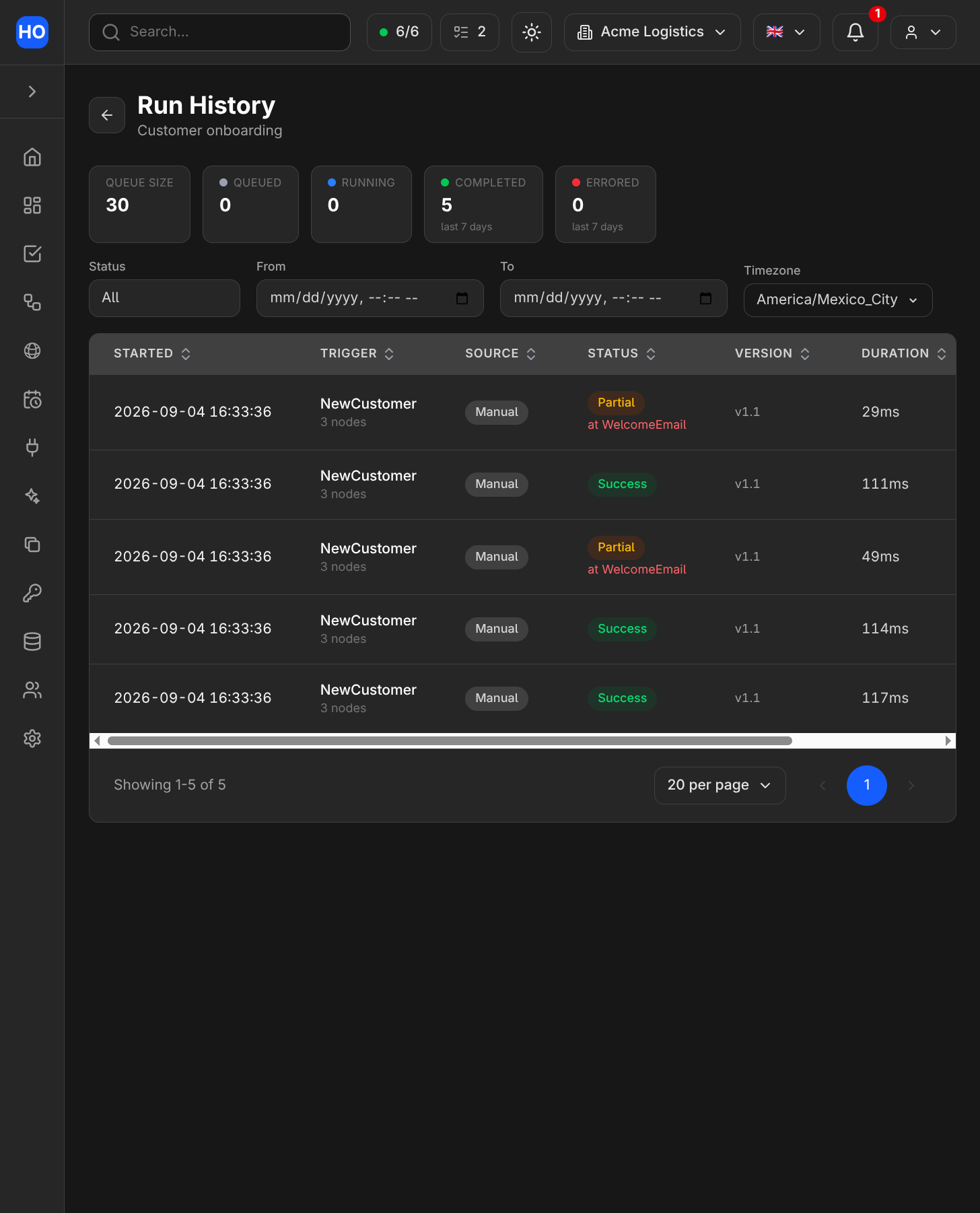
A process's run history, with a mix of Complete and Partial runs; a Partial run names the node that errored.
Reading run history
Failure notifications name the process and open its run history with the affected
run's details already displayed. The run can also be shared using
/process/<process-public-id>/runs?run=<run-id>. Opening a link preserves the
same organization and run-visibility checks as opening the history directly.
Run history is the debugging surface. For a failed run it names the node that failed and
shows what that node received, which is almost always the answer. It is also readable
from outside the app: listProcessRuns and getProcessRun in the
GraphQL API return the same data the UI shows, filtered the same way.
Two things run history deliberately does not do. It does not keep a copy of your files inline — a step that produces a file records a reference to it, and reading the file is a separate, permission-checked request. And it does not retain run data forever; files produced by runs expire on a fixed clock, so a run from long ago may name a file that no longer exists.