Tasks and forms
A task is the human half of a process. It is a work item with exactly one assignee, a due date, a priority, and a record of everything that ever happened to it.
What a task carries
| Name and description | The description renders Markdown, so a workflow can hand someone a formatted brief rather than a wall of text. |
| Assignee | Always exactly one member. There is no unassigned pool — see Teams and availability for how a workflow picks the person. |
| Team | Optional. A task assigned through a team remembers which team, which is what makes automatic reassignment possible later. |
| Due date and priority | The due date can carry a time of day, not just a date. |
| Notes | Free text the assignee owns. |
| Metadata | Arbitrary JSON your workflow attaches — an external id, a customer reference, a source system. Selected keys can be surfaced as badges on the task. |
| Embedded pages | Named URLs rendered inside the task, so the assignee has the record they need open without hunting for it. |
| Attached files | Files a workflow produced or fetched — a PDF a Call HTTP node downloaded, a document from Google Drive, an extract from an archive — attached by a Create or Update Task node. Images and PDFs open in place in the task; everything else downloads. An attached file is kept for as long as the task exists, even past the usual 30-day retention of workflow files. |
| Form | At most one, from your organization's form library. |
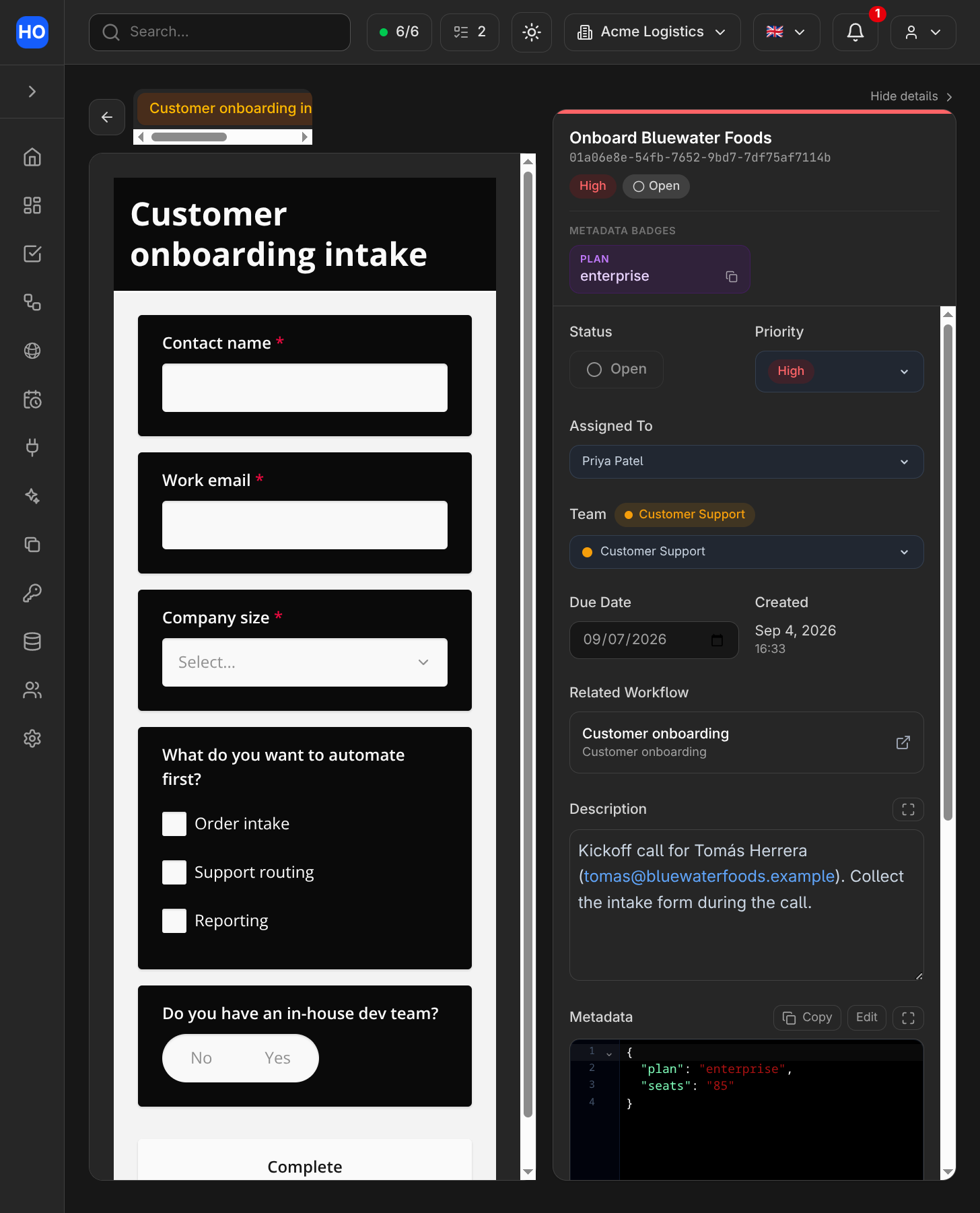
A task with its attached intake form, a metadata badge, an embedded CRM page and the full detail panel.
Who creates tasks
Tasks come from four places, and the difference is visible on the task itself, not guessed at:
- a member, in the app;
- a workflow run, through a Create Task node;
- an agent run or Barry, when you ask for one;
- the GraphQL API, using an organization API key.
Lifecycle
Created → assigned → completed. Completed tasks can be reopened. Two behaviours are worth calling out because they exist to make automation safe:
Completion lock. A workflow can create a task that only the workflow may close. The assignee still does the work and records it, but the Complete button is theirs to press only when the automation says so — useful when "done" depends on something the person cannot see, like a downstream system confirming.
Deduplication. A Create Task node can carry a deduplication id. Re-running the same workflow for the same subject then updates the existing task instead of creating a second one. This is what makes a retried or rescheduled run safe: automations that create work are the ones you least want to be accidentally idempotent-by-hope.
Forms
Forms live in an organization-wide library, built once and reused. A form can be used in two ways.
Attached to a task
A Create Task or Update Task node attaches a form. Two options shape how it behaves:
- Required — the task cannot be completed until the form is submitted. This is enforced by the server, not by a disabled button, so it holds for the app, the API and AI surfaces alike.
- Auto-complete — submitting the form completes the task in the same action.
A node can also seed answers: values your workflow already knows are pre-filled, and the assignee only fills in what is genuinely new.
The node also chooses a presentation — how the assignee sees the form:
- Full form — the form gets its own tab in the task's full view. The side panel shows which form is attached, whether it is required or already submitted, and a button to open the full view.
- Inline form — a small form (at most three questions) rendered right under the task's badges, in the side panel as well as the full view. Saving a workflow that points an inline form at a bigger library form is refused, naming the form.
- Approval — an Approve / Reject pair under the badges. No library form is needed:
the decision is the form. It lands in
task.form.data.decisionasapprovedorrejected, so a Task Update trigger can branch on it. - Approval with notes — the same pair plus an optional note (
task.form.data.notes).
The two approval presentations are always required and always complete the task on submit: the decision is the task's resolution.
Attaching a form freezes a copy of it. The task keeps the exact version of the schema it was attached with, so editing the library form never disturbs tasks already in flight, and a submission from last quarter is still interpretable against the questions that were actually asked. Pushing a newer version onto existing tasks is an explicit action, never something that happens behind your back.
Answers become data for automations: a Task Update trigger carries the submitted answers, so a workflow can branch on what someone answered.
Shared as a public link
The same form can be shared as a link that anyone can answer without a Honeybase account. A share has its own token and its own controls: an optional password, an expiry, and a cap on how many responses it accepts. Revoking a link is final for that link — re-sharing mints a new one, so "the link in that email thread is dead" is a true statement rather than a hope.
As with task forms, a share freezes the schema it serves, and every response records which version it answered.
Responses are stored whether or not any workflow is listening. A Form Submission trigger starts a run for each one, which is how an intake form becomes a routed piece of work. Workflows can also mint a pre-filled link for one named person — a Create Pre-filled Form node produces the URL, a Send Email or Slack node delivers it, and the answer arrives later as its own run carrying the correlation data the workflow attached. The workflow does not wait; that is the point.
Forms accept file uploads. The file goes straight from the respondent's browser to storage, and the response records a reference to it rather than the bytes.
The audit trail
Every change to a task is recorded: which field, its old value, its new value, when, and who made the change. "Who" is specific — a named member, a workflow run, an agent run, Barry, or an API key by name. Nothing writes to a task anonymously, and nothing impersonates a person to get a tidier trail: a task Barry edits says so.
The trail is readable through the API (taskUpdates), which is the honest answer to "why
does this task say what it says".
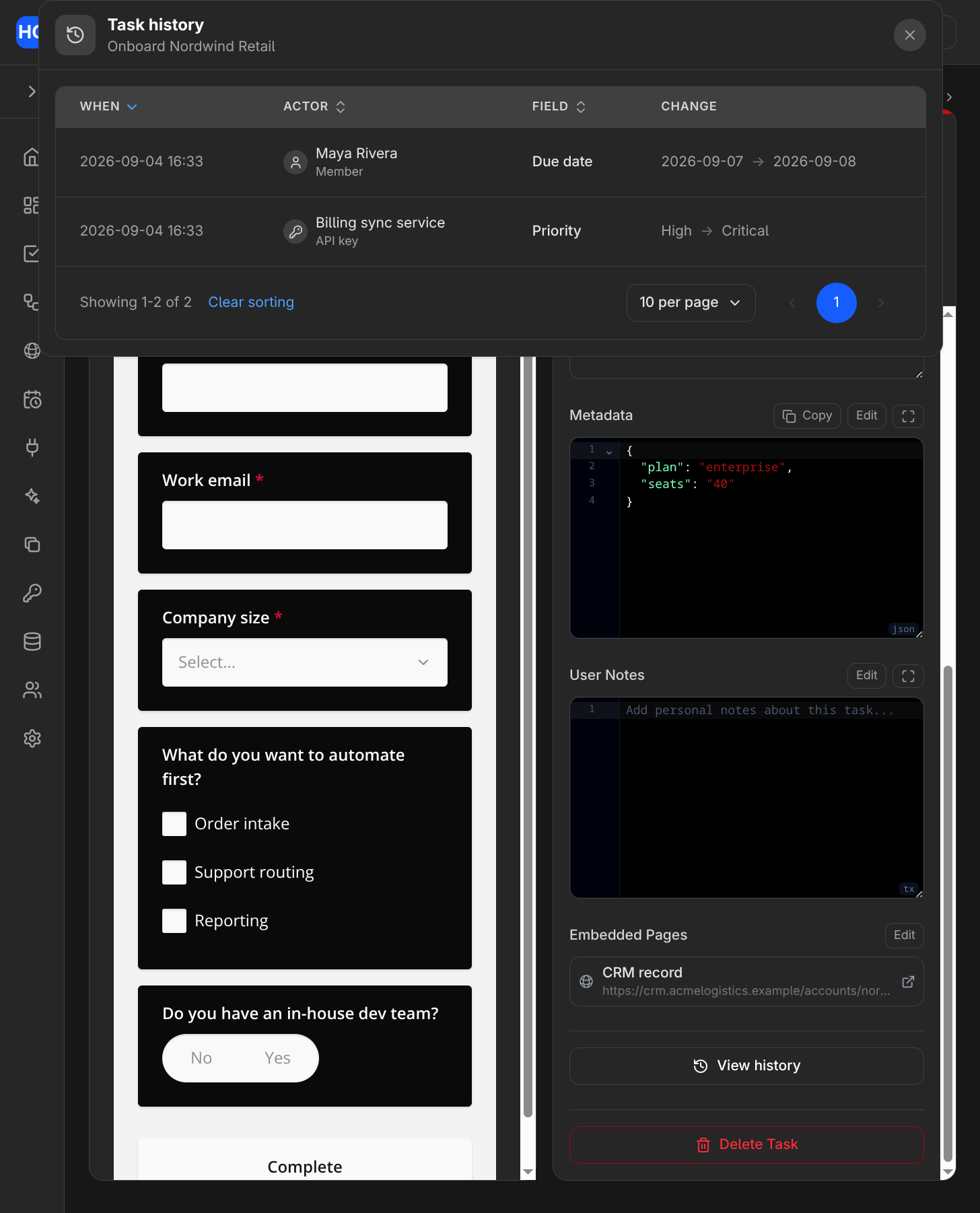
The audit trail records every change with its actor — here a member and an API key — and the old and new values.
Finding tasks
Members see their own work; a saved task view is a named filter — process, assignee,
team, priority, due window, free text — that can be pinned so the list you care about is
the one that opens. Workflows read tasks with a Get Tasks node, and external systems read
them through the tasks namespace of the GraphQL API.
One rule applies to both: filter at the source. Fetching everything and sorting it out afterwards drags in unrelated work and silently misses matches beyond the result limit.